Partner program
Join the Fullmetrix partner program, follow your prospects and clients, share your affiliate link and receive your commissions.
The partner program is for e-commerce agencies that recommend Fullmetrix to their clients. Each store that subscribes thanks to you earns you a recurring commission on its subscription.
The program has its own space, the Partner portal, separate from the app your clients use. You will not find it in the Fullmetrix sidebar. It has four pages, Dashboard, Prospects, Commissions and Settings.
Join the program
Create your space
Open the Become a partner page. Fill in Agency name, Your name, Work email, Password and, if you wish, Website (optional).
Confirm
Click Create my partner workspace. If the message An account already exists with this email. Sign in instead. appears, sign in with that account instead.
Sign in later
To come back to your space, open the Partner portal page and sign in with your email and password.
If you are invited to join the space of an agency that is already a partner, you receive a link to the Join page followed by the agency name. Click Join the partner portal with the same address that received the invitation.
Follow your activity on the dashboard
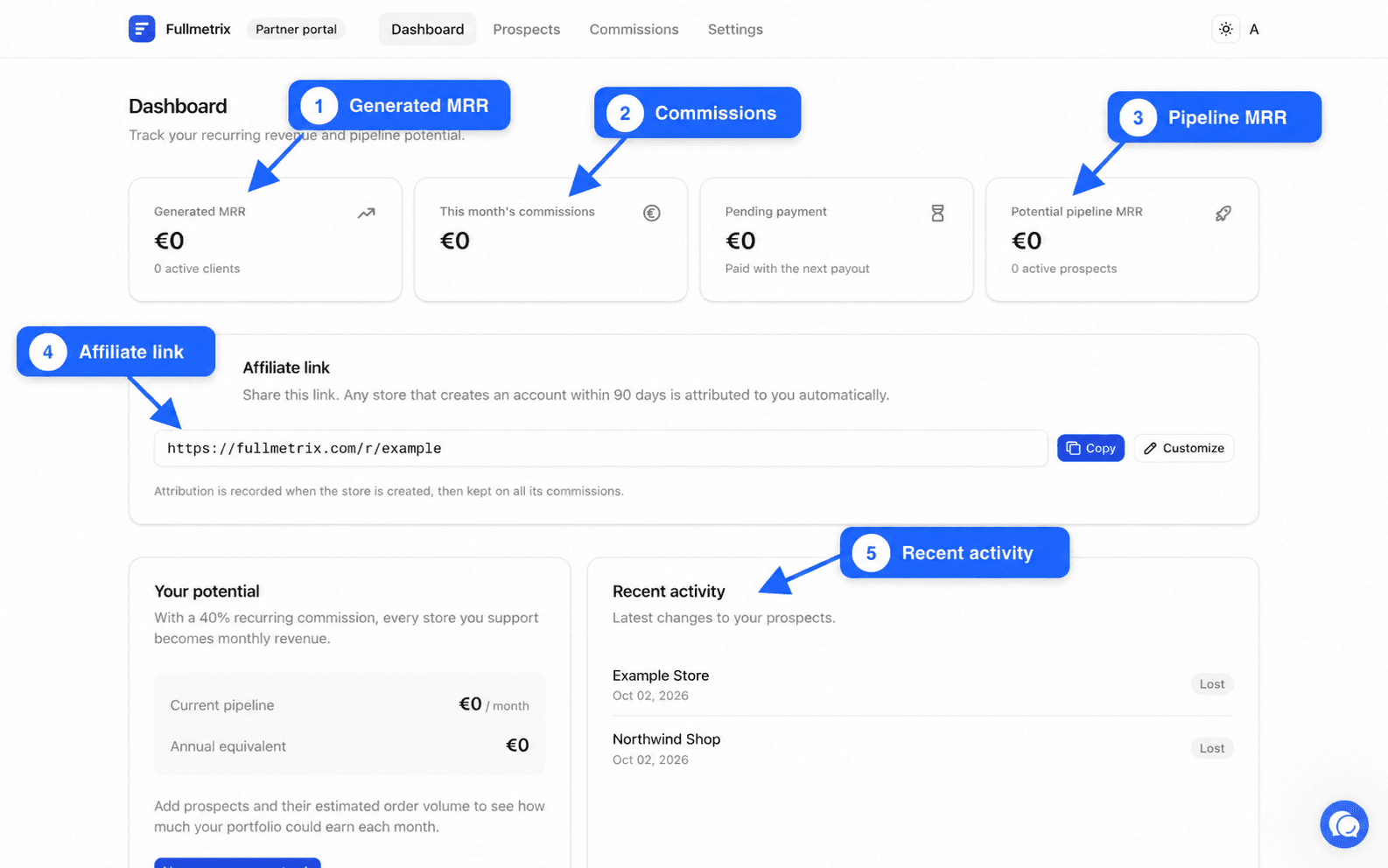
The Dashboard sums up what your clients and pipeline bring in.
| Card | What it shows |
|---|---|
| Generated MRR | The monthly recurring revenue of your active clients, with their number |
| This month's commissions | The amount of your commissions for the month, Paid with the next payout |
| Potential pipeline MRR | What your active prospects could represent each month |
The Your potential card calculates what your pipeline would earn you per month and over a year, based on your commission rate. Recent activity lists the latest changes to your prospects.
Share your affiliate link
The Affiliate link card on the dashboard holds your personal link. Click Copy to copy it, then share it with the stores you support, by email, in a proposal or on your website.
Any store that creates its Fullmetrix account within 90 days of clicking your link is attributed to you automatically. Attribution is recorded when the store is created and stays on all its commissions.
For a more readable link, click Customize and choose the end of the link, with letters, numbers and dashes, from 3 to 32 characters. If the message This link is already used by another agency. appears, pick another one. Click Save.
Follow your prospects
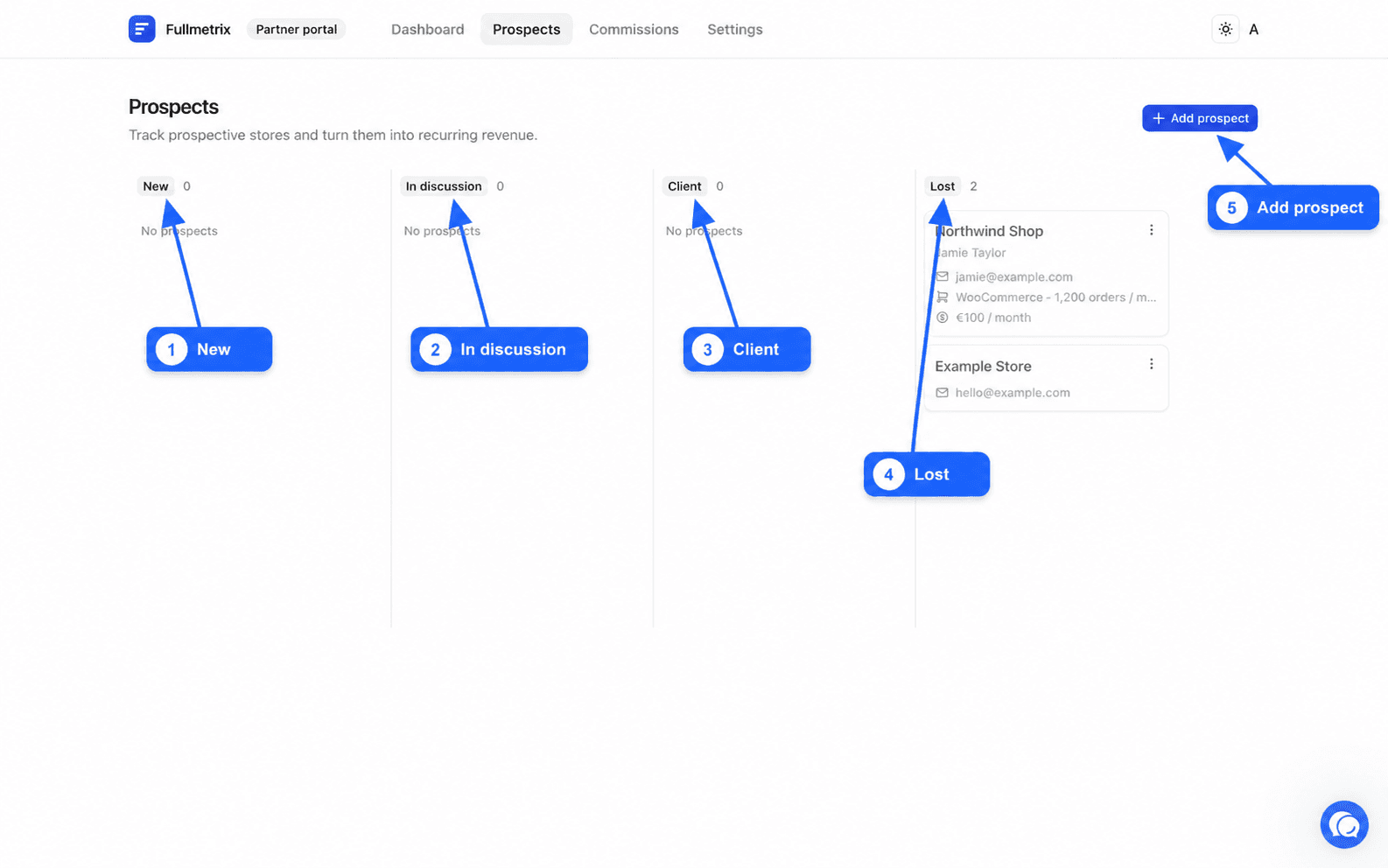
The Prospects page sorts your stores into four columns, New, In discussion, Client and Lost. Each card shows the store name, its Orders / month volume and the estimated Commission, or No invoice yet. A store that came through your link shows Via affiliate link.
Add a prospect
Click Add prospect. Fill in Store name, Store URL, Contact name, Contact email, Platform and Orders / month. You can also enter WhatsApp messages / month (optional) and Notes.
The Estimated commission is calculated as you type, from the order volume, the matching subscription price and your rate. It is an estimate. Your real commission depends on the invoices the client pays.
Move a prospect forward
On a card, the Actions menu offers Move to to change column and Delete to remove it for good. Open shows the prospect details, which you can edit then Save.
Follow your commissions
The Commissions page lists your commissions by invoice, with the Date, Client, Invoice, calculation Base, Rate, Amount and Status.
| Status | What it means |
|---|---|
| Pending | The commission is calculated but not approved yet |
| Approved | The commission will be paid with the next payout |
| Paid | The commission has been paid to you |
A commission appears as soon as the client has paid their first invoice. Until then, the page shows No commissions yet.
The Payouts part groups your monthly payments, with the Period, Amount and payout Reference. Approved commissions are grouped and paid once a month by bank transfer.
Your terms and bank details
The Settings page has two parts.
Your terms shows the terms negotiated for your agency, which apply to all your clients, the Commission rate, the Commission duration and the Trial offered to clients. These values prevail, even if an older proposal said something else.
Bank details is used for your payouts. Fill in the Account holder, IBAN, BIC, Billing address and VAT number, then click Save. The message Bank details saved confirms it.
Protect your bank details
Only enter your IBAN and BIC on the Settings page of your Partner portal. Never send them by email.
What your client sees
We can prepare a Fullmetrix workspace for one of your clients. Write to us from Contact support to discuss it. Your client then receives an invitation announcing the free trial days offered by your agency. They click Activate my free trial to create their account, or Explore my workspace if they already have one. They then use their space like any Fullmetrix merchant, and you have no access to their data through the Partner portal.
To work in a client's reports, ask them to invite you as a User on their organization, as explained in Team and roles.