Disconnect and uninstall
Stop Shopify synchronization, remove imported Fullmetrix data, or uninstall the Shopify app safely.
Disconnecting in Fullmetrix and uninstalling in Shopify have different effects. Choose the action that matches your goal.
| Action | Effect |
|---|---|
| Reconnect | Refreshes Shopify authorization and keeps the existing Fullmetrix connection. |
| Disconnect in Fullmetrix | Revokes the active integration, removes Fullmetrix webhooks and storefront tracking, and permanently removes the connection and its imported order data. |
| Uninstall in Shopify | Revokes Shopify app access and stops future synchronization. Shopify notifies Fullmetrix of the uninstall. |
Recommended complete-removal order
- Export anything you need from Fullmetrix.
- In Fullmetrix, open Settings > Integrations.
- On the Shopify e-commerce store card, click Disconnect.
- Read the confirmation carefully. Fullmetrix states that the connection and imported order data are removed and cannot be recovered.
- Confirm Disconnect only when you are ready.
- In Shopify, open Settings > Apps.
- On the Fullmetrix row, open the … menu and choose Uninstall.
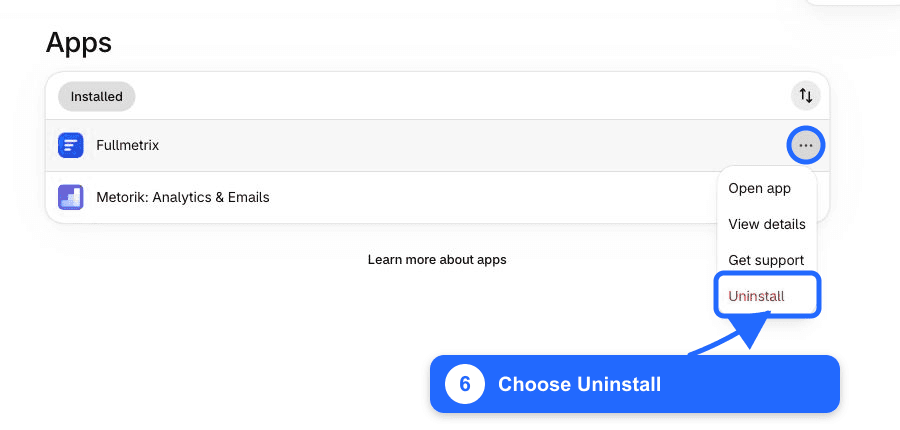
- Review Shopify's confirmation and click Uninstall.
Disconnecting in Fullmetrix is irreversible
The Fullmetrix confirmation removes the store connection and imported order data. Reconnecting later starts a new import; it does not restore the removed connection.
If you uninstall only in Shopify
Shopify revokes the app's API access and sends Fullmetrix an app-uninstalled notification. Future synchronization stops. This is not a substitute for using the Fullmetrix Disconnect action when your intent is to remove imported Fullmetrix data.
Shopify also recommends reviewing billing, external subscriptions, saved app data, and dependent workflows before uninstalling. See Uninstalling apps.
Reconnect later
Return to Fullmetrix, create or select the intended organization, and repeat Authorize and connect. Shopify may show Install for a removed app or Update when an installed app needs refreshed access.