How synchronization works
Understand how your orders, customers and products reach Fullmetrix, how often, and what synchronization never touches.
Synchronization is the copy of your store's data into Fullmetrix. Your orders, customers and catalog stay in your store. Fullmetrix keeps a copy that it updates, and calculates your reports from that copy.
It happens in two stages. First a full import of your entire history, once, right after you connect. Then continuous updates, which pick up every new order and every change.
The full import, once
When you connect your store, Fullmetrix imports its whole history, from the very first order. There is no date limit. Depending on the size of your store, this takes from a few minutes to several hours.
You can close the page during the import, it keeps going without you. Everything is explained in Historical import.
Continuous updates
Once the import is done, your store and Fullmetrix stay linked. Every new order, status change, refund and product edit reaches Fullmetrix without you doing anything.
How long an order takes to appear
The delay depends on the platform, because each one notifies Fullmetrix in its own way.
| Platform | How Fullmetrix learns about a change | Usual delay |
|---|---|---|
| Shopify | Shopify notifies Fullmetrix of every order, customer, product or refund | A few seconds |
| WooCommerce | The Fullmetrix module sends each change as it happens | A few seconds |
| Sylius | The Fullmetrix module sends each change as it happens | A few seconds |
| PrestaShop | The module records each change, and Fullmetrix collects them continuously | A few seconds to a minute |
| Magento | The module sends changes in batches, using Magento's scheduled tasks (cron) | One to two minutes, if Magento's scheduled tasks are running |
On top of these, Fullmetrix checks every store every 15 minutes, then again every hour. These passes pick up anything that was missed, for example during a hosting outage. At worst, an order therefore appears within 15 minutes.
Magento scheduled tasks
The Magento module relies on your server's cron, a task Magento runs every minute. If your hosting provider doesn't run it, changes only arrive during Fullmetrix's checks, so at most 15 minutes later.
Orders deleted in the store
If you permanently delete an order in your store admin, Fullmetrix removes it too. This check runs twice a day on PrestaShop, WooCommerce, Magento and Sylius. To be safe, it only looks at orders older than 24 hours and waits to see the order missing twice, several hours apart, before removing it. A deleted order can therefore stay visible until the next day.
Cancelling an order is not deleting it. A cancelled order stays in Fullmetrix with its new status, and you decide whether it counts in reports. See Data accuracy.
What Fullmetrix imports
| Data | What is included |
|---|---|
| Orders | Status, dates, total, discounts, shipping, taxes, fees, coupon codes used, payment method, country and every product line |
| Customers | Your store's customers and their contact details |
| Products | Products and their variants, with price, compare-at price, stock, brand, suppliers, characteristics and images |
| Categories | Your product category tree |
| Coupons | Discount codes and their rules |
| Refunds | Each refund with its amount and date |
| Subscriptions | Subscriptions, for WooCommerce stores that sell them |
Abandoned carts are imported from Shopify. On the other platforms, they come from site tracking, which records what your visitors do.
Some data doesn't exist on every platform or in every store. The matching reports, such as Brands, Suppliers or Subscriptions, only appear in the menu when your store contains that kind of data.
What synchronization never touches
Synchronization reads your data, it doesn't change it. Fullmetrix doesn't modify your orders, products, prices or customers.
Two features you turn on yourself write to your store, outside of synchronization. On Shopify, site tracking installs a small measurement script. And a form or a WhatsApp automation that offers a discount code creates that code in your store.
Other data sources
Google Analytics, Search Console and ad platforms (Google Ads, Meta Ads, TikTok Ads, ChatGPT Ads) work differently. Fullmetrix doesn't copy their history. It queries these services when you open a report and keeps the answer for up to one hour. An ad platform number can therefore lag by up to an hour in Fullmetrix, on top of the time the platform itself takes to count its conversions.
Start a sync by hand
You normally don't need to start anything. If you just fixed a problem, for example a firewall rule, you can force an update.
Open the store card
Open Settings, then the Integrations tab. In the E-commerce category, find your store's card.
Click Sync
Click Sync. The dot turns blue and blinks during the update. Only changes since the last sync are fetched, so it's short.
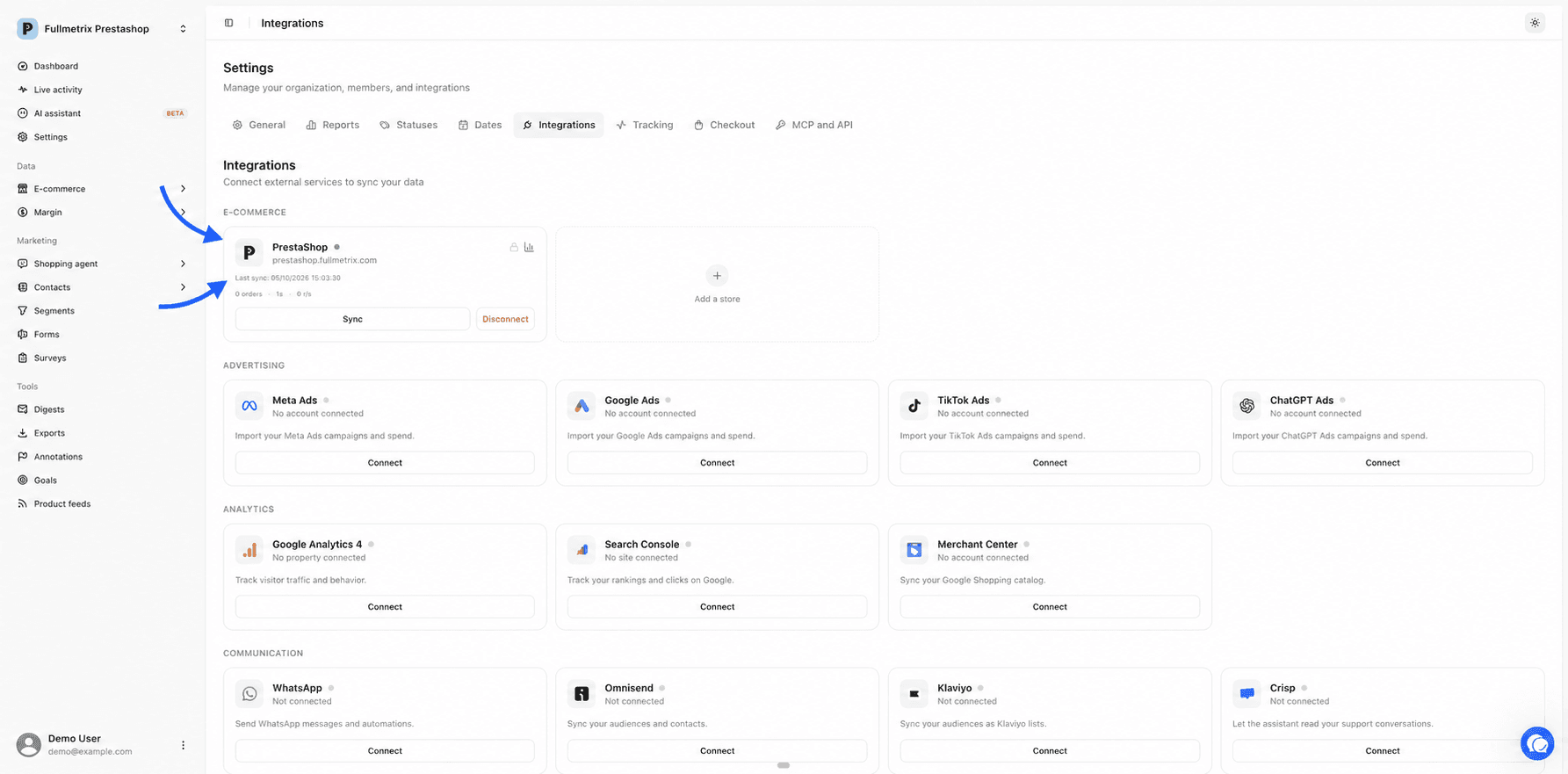
Check the date
When the dot turns green again, the Last sync line shows the new date and time, in your computer's time.
Only one sync can run at a time for a store. While it runs, the button is greyed out. If the card shows Resume or Reset instead of Sync, the last attempt failed. Read Sync status.